Simulator effects for Roblox: coins, pets, rebirth and level up
Free effects for Roblox simulator games: coin pickups, chest openings, rare drops, pet hatches, rebirth pillars and level ups as flipbooks, with Luau that plays one when a stat goes up.
Simulators reward the player every few seconds: a coin, a stat, an egg, a rebirth. Each reward needs a small, satisfying burst, and the big moments (a rare pet, a rebirth) need something that fills the screen. Because the player sees hundreds of these, they should be cheap, and in a simulator most of them only matter to the player who earned them.
Rewards, pets and rebirths
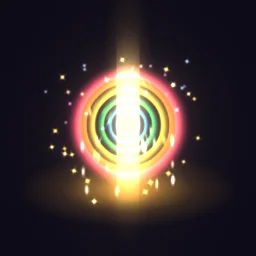 Rebirth Burst
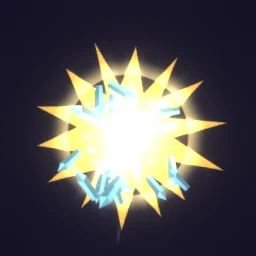 Pet Egg Hatch
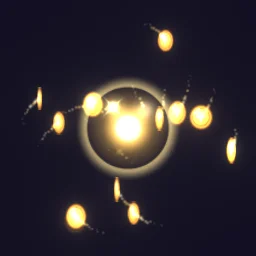 Coin Magnet Collect
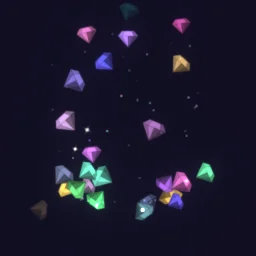 Gem Shower
 Treasure Chest
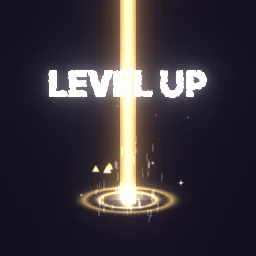 Level Up
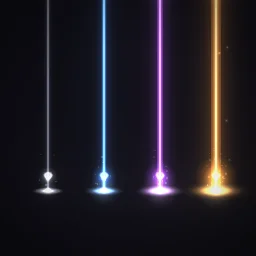 Loot Beams
 Gold Dust Puff
- Chests and eggs: Pet Egg Hatch for a hatch that wobbles, cracks and bursts, Treasure Chest for an opening, Loot Beams for a rarity reveal.
- Level up and rebirth: Level Up around the player, and Rebirth Burst for a rebirth: a gold ring, a pillar of light and rainbow rings.
- Coins and gems: Gold Dust Puff for a single pickup (keep it small, 3 to 4 studs, with a 512 px texture), Coin Magnet Collect while coins fly to the player, Gem Shower for a big payout.
Play it when a stat goes up
Simulators keep progress in leaderstats. A LocalScript can watch the player's own stat and play an effect at the character when it changes. It runs on that player's machine only, which is what you want for personal rewards: other players are not shown everyone else's level-ups.
-- LocalScript in StarterPlayerScripts
local Players = game:GetService("Players")
local ReplicatedStorage = game:GetService("ReplicatedStorage")
local Debris = game:GetService("Debris")

local player = Players.LocalPlayer
local level = player:WaitForChild("leaderstats"):WaitForChild("Level")
local template = ReplicatedStorage.Effects:WaitForChild("Level Up")

level.Changed:Connect(function()
	local root = player.Character and player.Character:FindFirstChild("HumanoidRootPart")
	if not root then return end
	local fx = template:Clone()
	fx:PivotTo(root.CFrame)
	fx.Parent = workspace
	Debris:AddItem(fx, 3) -- Lifetime 2 s + 1
end)
For a coin pickup, play the effect at the coin's position just before you remove the coin. For a rebirth that everyone should notice, fire a RemoteEvent from the server to all clients instead, as on anime VFX.
Settings for simulators
- Texture size: coins, gems and hearts are small on screen, so a 512 or 256 px texture is enough and costs a quarter or a sixteenth of the memory of 1024.
- Words in the effect: Level Up and some reward effects have English text drawn into the frames. If your game is translated, pick effects without words, or remove the text layer in the studio before you export.
- Pets: weld the effect to the pet the same way as an aura, with a small Size and a positive ZOffset so the hearts draw in front.
- Counters in the HUD: a coin flying into the score belongs in the ScreenGui, not the world. See UI effects.
The flipbook PNG is free: the ROBLOX button on every effect page needs no account, and a free account can also export it from the studio (3 effects a day) with the grid and texture size of your choice. The ready model, a .rbxmx with the emitter set up and a script that plays it, plus UIFlipbook.luau for UI, comes with any plan, from $7.99 a month.
Get it into your game
Every setting and both ways in, free PNG or ready model, are on the Roblox setup page. More picks by genre are on Free Roblox VFX, and any effect can be changed in the studio before you export it: turn the gold coins into gems or your own currency colour.
Questions
Should simulator reward effects show for every player?
Usually not. Personal rewards such as coin pickups and level ups play best on the earning player's machine only, from a LocalScript. Save server-wide effects for big moments such as a rare hatch or a rebirth.
Will hundreds of coin effects slow the game down?
Each effect is a single particle, so even many at once are light. Clean each one up with Debris after it has played, and use a 512 or 256 px texture for small effects to save memory.
Can I change the coin colour to match my currency?
Yes. Open the effect in the studio and change its colours, or tint it in Roblox with the emitter's Color property, which multiplies the texture.
Can I use these effects in a game that earns Robux?
Yes. Exported effects, including ones started from the library, may be used in any project, commercial games included, with no credit required. Reselling the library itself as an effect pack is not allowed.