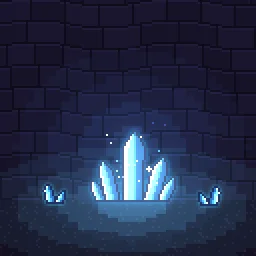
Pixel Art Glowing Crystals: A pixel art cluster of glowing blue crystals in a dark cave: it breathes light onto the floor and walls, a shine sweeps across the facets, glints sparkle and motes rise off the tips.

Pixel Art Glowing Crystals

A pixel art cluster of glowing blue crystals in a dark cave: it breathes light onto the floor and walls, a shine sweeps across the facets, glints sparkle and motes rise off the tips. Loops, for caves, mines and resource nodes.

Pixel Art Glowing Crystals is a pixel art effect that loops seamlessly every 4 seconds, drawn on a 384 by 384 canvas at 3x pixels. It is built from 4 particle emitters. Most layers blend additively, so it glows on dark backgrounds.

Colour

Recolours the preview and the free downloads.

Free download with a transparent background, cropped to the effect, 120 frames at 30 fps. Use it in commercial games, no credit needed.

Licence: use it in any project, including paid commercial games such as a game sold on Steam. There is no per-project licence to buy and no credit needed. Terms.

Roblox: the download is a flipbook for a ParticleEmitter. Set FlipbookLayout to Grid8x8, FlipbookMode to OneShot and Lifetime to 4, then emit one particle per cycle. Roblox setup.

REMIX WITH AI

Try:

Left empty, it just opens in the agent, free. Each change is one AI build, and you start with free builds.

Engine data for Unity, Godot, GameMaker and Aseprite comes with a plan: open it in the studio.

OPEN IN THE STUDIO

Change the colours, timing or size, or export for Unity, Godot 4, GameMaker, Phaser, PixiJS and Aseprite.

Try variations: new colours, motion and shapes of this effect, free in the studio.

FRAME BY FRAME

8 evenly spaced moments across the 4 s loop.

Pixel Art Glowing Crystals at 8 moments, from 0 s to 3.5 s

HOW IT'S MADE

Pixel Art Glowing Crystals is pixel art, drawn at 3x pixels so it sits on the same grid as your sprites, and built from 4 particle emitters. Techniques worth a look: sprite modules, flipbook sprites, keyframed parameters and post filters (bloom). A scene layer (ground or a prop) shows in the studio for context and stays out of every export.

It loops seamlessly every 4 s, and one layer fires in bursts, so it pulses instead of flowing evenly. To change its colour, select "Wall light" in the studio and edit Colour A and Colour B. Size on the same layer sets how big its particles are. Pixel size in the Pixel art panel sets how chunky it looks. The colour swatches by the downloads recolour every layer at once.

Layers, in draw order

  1. Wall light, Floor lightparticles / additiveA single long-lived particle that stays for the whole loop.
  2. Small crystals, Small crystalsspriteA placed image. Extras: glow and hit flash.
  3. Crystal clusterspriteA placed image. Extras: glow, shine sweep and hit flash.
  4. Crystal motesparticles / additiveA steady stream of image sprites across a box. They sway from side to side. Colour runs from white to blue over each life.
  5. Facet glintsparticles / additive7 single particles at set times. They play a flipbook animation. Colour: white.

DETAILS

Length
4 seconds, seamless loop
Canvas
384 x 384, pixel art at 3x
Layers
4 emitters
Blend
Mostly additive (glows)
Colours
whitebluecyanpale cyan
Sprites
Built-in shapes only
Tags
pixel art, crystals, glowing crystals, cave, gem, mining, sparkle, loop

USING IT IN YOUR GAME

Phaser, PixiJS
The PNG sheet is a plain grid of frames that both can slice. A TexturePacker JSON atlas comes with a plan, from the studio.
Unity
Import the PNG sheet as a Sprite with Mode set to Multiple and slice it, or open the effect in the studio for a ready-made grid.
Godot 4, GameMaker, Aseprite
Open it in the studio and pick your engine in Export: with a plan, it writes the files that engine imports.
Web and chat
The GIF plays anywhere; the APNG keeps soft edges on any background.
Blend mode
This effect is made of light. For the same glow in your game, draw the sprite with additive blending, or export it on black from the studio for additive shaders.

Step by step: Unity, Godot 4, Roblox, GameMaker, Phaser and PixiJS, Aseprite, Web games (live runtime). Drawn with additive blending: see glow effects without a black box.

MORE Pixel Art World

YOU MIGHT ALSO LIKE

All Pixel Art World effects or the full library.