Shape language for VFX: circles, triangles and squares
Shape language for game VFX: what circles, triangles and squares say, silhouettes that read at game scale, and primary, secondary and tertiary shapes, applied to particle effects.
Before a player knows what an effect is, they have already felt what it means. A soft round cloud feels harmless; a burst of spikes feels like it will hurt. That first read comes from shape, and it happens faster than colour or detail can register. Shape language is using that on purpose: choosing shapes that say the right thing, arranging them so the whole effect has one clear outline, and keeping the detail from getting in the way.
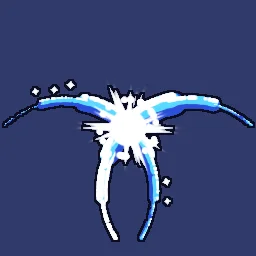 Crescent X slash
 Smoke poof
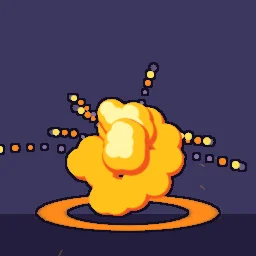 Cel explosion
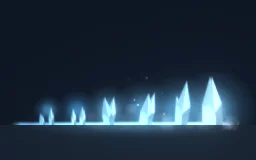 Glacial Spike Line
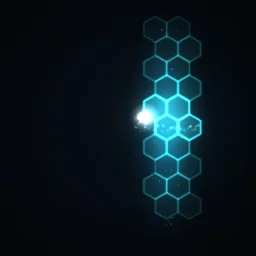 Hex Force Field
 Rare drop sparkle
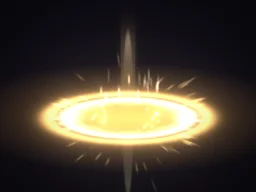 Holy Nova
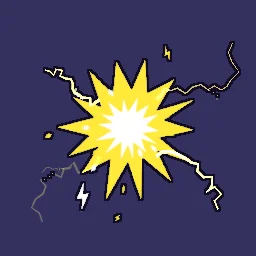 Cartoon shock
What the three basic shapes say
| Shape | Reads as | Use it for |
|---|---|---|
| Circles and soft curves | Safe, friendly, complete, natural | Heals, pickups, bubbles, smoke, shields, areas of effect, magic that helps |
| Triangles, spikes and wedges | Danger, speed, direction, aggression | Slashes, hits, critical strikes, ice and rock spikes, enemy attacks, anything that points |
| Squares and straight edges | Stable, solid, built, mechanical | Tech and sci-fi, defence, barriers, UI frames, digital and pixel effects |
Most good effects mix the shapes but let one lead. Smoke Poof is almost all circles, so it reads as a harmless vanish. Glacial Spike Line is all triangles pointing up, so it reads as a threat before you see that it is ice. Hex Force Field uses hexagon cells, close cousins of the square, so it reads as built and solid. Holy Nova puts a cross gleam over round rings: round for healing, straight lines for the holy, radiant edge.
Direction is part of shape. A triangle points; a long thin shape implies the way it is moving. Stretch shapes along their motion to show speed, curve them along an arc to show a swing, and point spikes away from the impact so the eye follows them outward. Crescent X Slash is two solid crescents that taper to points: the curve shows the swing and the points show the edge.
Silhouette: one outline, read at a glance
Fill an effect solid black and look at the outline. If you can still tell what it is, it has a good silhouette. If it is a cloud of disconnected dots, it will vanish against a busy game background. Effects need a strong silhouette more than characters do, because they are on screen for less than a second.
- Clump, then scatter. Group the main particles into one mass and let only the small details fly apart. Twenty overlapping lobes read as one cloud; twenty spread-out dots read as noise.
- Vary size a lot. A few big shapes and many small ones make a clearer silhouette than many shapes of the same size.
- Leave negative space. A ring with a clear hole in the middle, or a slash with an empty arc inside it, is easier to read than a filled blob.
- Outline it. Cartoon effects wrap every shape in one ink line, which merges overlapping lobes into a single drawn mass. Cel Explosion does this with the Outline post filter.
Readability at game scale
You build effects on a large canvas, but players see them small: a hit spark may be 48 pixels across on a phone. Detail that looks rich at full size turns to mush when it is shrunk. Always judge an effect at the size it will be in the game.
- Zoom the canvas out with the Zoom out button until the effect is its real size on screen, and play it there.
- Make the primary shape at least a quarter of the effect's width at its largest, so it survives being shrunk.
- Fewer, bigger particles read better than many tiny ones, especially in pixel art, where anything under a pixel or two disappears.
- Keep thin lines thick enough to survive. A Trail or a stretched spark one pixel wide on the canvas will flicker in and out at game size.
Primary, secondary and tertiary shapes
Rank the shapes in an effect by how much they matter, and give each rank a different job. This is the main defence against effects that look busy but say nothing.
- Primary: the one big shape that carries the read, such as the fireball, the slash crescent or the shield bubble. It is the largest, the brightest or the most solid, and it is there at the impact. If you hid everything else, the effect should still make sense.
- Secondary: shapes that support the primary and give it context, such as a shock ring, a ground crack, smoke behind a fireball or speed lines behind a slash. They are smaller or dimmer and often arrive a frame or two later.
- Tertiary: small details that add life, such as sparks, debris, stars and motes. There are many of them, they are small, and they never compete with the primary for attention.
A rough guide to proportion is one primary, two or three secondaries, and as many tertiaries as you like as long as each is small. Rare Drop Sparkle shows the order clearly: the gem in its light pillar is primary, the orbit ribbons and ground ring are secondary, and the four-point twinkles are tertiary.
Apply it in the studio
- Open an effect such as Cel Explosion. In the layers panel, use the eye button (Hide) on each layer in turn to see which one is the primary and how the effect reads without its details.
- Choose the shape for each layer with Sprite in its Appearance section (switch the Inspector to All settings to see every section): built-in sprites include circle, soft, triangle, diamond, star, ring, spark, streak, hexagon, shard and debris. Use your own image for shapes the list does not have.
- Under Look, set Size so the primary is clearly the biggest, and use Aspect to stretch shapes. Turn on Align to velocity so long shapes point the way they move, or set Draw as to Stretch to lengthen sparks with their speed.
- Give shapes their life with Size over Life: a toon shape pops in with a little overshoot, holds, and shrinks out. Stretch over Life squashes and stretches them.
- For an ink outline, select Effect settings and under Post filters press Add filter and choose Outline. Turn Post filters off in a layer's Appearance section to keep it out of the outline.
- Check the silhouette and the read at game size: zoom out, and temporarily add a Grayscale filter and a Posterize filter with 2 or 3 levels to see the masses without colour. Remove them before you export.
Try a shape on the agent
Describe the shape language you want and the agent builds it on a live canvas, then checks its own render. Your first build needs no account.
Questions
What is shape language in VFX?
Choosing shapes for what they make the player feel: round shapes read as safe, pointed shapes as dangerous and fast, square shapes as solid or mechanical. It works before colour or detail are noticed.
Why do my effects look messy in the game?
Usually because every particle is the same size and spread evenly, so there is no main shape. Make one primary shape clearly the largest, clump the main particles together, and check the effect at its real size on screen.
Do cartoon effects need outlines?
Not always, but an ink outline around the whole effect helps it read as one drawn mass against any background. The Outline post filter in the studio draws one around every shape.