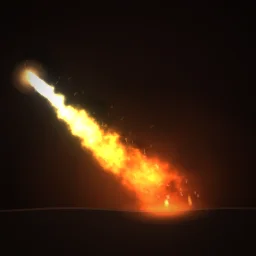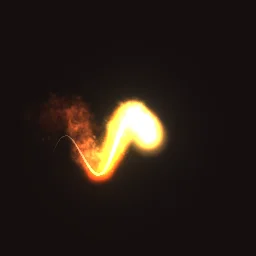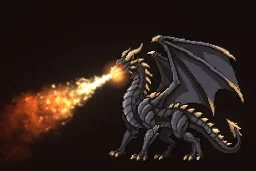
Dragon Fire Breath: Fire breath for a dragon sprite: a glow builds in the throat, then a roaring cone of flame pours down from the jaws along the angle of the head, sets the ground alight and scorches it, under black smoke and a heat haze.

Dragon Fire Breath

Fire breath for a dragon sprite: a glow builds in the throat, then a roaring cone of flame pours down from the jaws along the angle of the head, sets the ground alight and scorches it, under black smoke and a heat haze. Loops. Swap in your own sprite. Sprite made with SpriteLab.

Dragon Fire Breath is an HD effect that loops seamlessly every 2.6 seconds, drawn on a 480 by 320 canvas. It is built from 7 particle emitters. Most layers blend additively, so it glows on dark backgrounds.

Colour

Recolours the preview and the free downloads.

Free download with a transparent background, cropped to the effect, 78 frames at 30 fps. Use it in commercial games, no credit needed.

Licence: use it in any project, including paid commercial games such as a game sold on Steam. There is no per-project licence to buy and no credit needed. Terms.

Roblox: the download is a flipbook for a ParticleEmitter. Set FlipbookLayout to Grid8x8, FlipbookMode to OneShot and Lifetime to 2.6, then emit one particle per cycle. Roblox setup.

REMIX WITH AI

Try:

Left empty, it just opens in the agent, free. Each change is one AI build, and you start with free builds.

Engine data for Unity, Godot, GameMaker and Aseprite comes with a plan: open it in the studio.

Drop in your own character with Use my sprite: it takes the hero's place at the same height and the whole effect follows it. Change the colours, timing or size, or export for Unity, Godot 4, GameMaker, Phaser, PixiJS and Aseprite.

Try variations: new colours, motion and shapes of this effect, free in the studio.

FRAME BY FRAME

8 evenly spaced moments across the 2.6 s loop.

Dragon Fire Breath at 8 moments, from 0 s to 2.28 s

HOW IT'S MADE

Dragon Fire Breath plays on a character sprite, with 7 particle emitters around it. The hero itself gets hit flash. Techniques worth a look: sub-emitters set off by other particles, collisions, turbulence, keyframed parameters and post filters (bloom and heat haze).

Every layer emits continuously and the 2.6 s loop closes seamlessly, so it can run for as long as you need. To change its colour, select "Fire Cone" in the studio and edit the Colour over Life gradient. Size on the same layer sets how big its particles are. To see it on your own character, press Use my sprite in the studio: every layer follows the new sprite. The colour swatches by the downloads recolour every layer at once.

Layers, in draw order

  1. ScorchparticlesSoft glows set off by "Fire Cone". Colour: black.
  2. Breath SmokeparticlesA stream of smoke puffs, its rate keyframed over the loop. They float upward, grow as they age, spin and slow down with drag. Colours range between dark grey and deep orange.
  3. HerospriteThe character sprite. Extras: hit flash.
  4. Throat Glowparticles / additiveA steady stream of soft glows. Colour: orange.
  5. Fire Coneparticles / additiveA stream of flames, its rate keyframed over the loop. They set off "Ground Fire" on impact, set off "Scorch" on impact, vanish when they hit something and grow as they age. Colour runs from pale gold to red over each life.
  6. Ground Fireparticles / additiveFlames set off by "Fire Cone". They float upward, swell and then shrink away and slow down with drag. Colour runs from pale gold to orange over each life.
  7. Fire Coreparticles / additiveA stream of soft glows, its rate keyframed over the loop. They grow as they age. Colours range between white and pale gold.
  8. Embersparticles / additiveA stream of soft glows, its rate keyframed over the loop. They float upward, wander on turbulence and slow down with drag. Colours range between pale gold and orange.

DETAILS

Length
2.6 seconds, seamless loop
Canvas
480 x 320, HD
Layers
7 emitters
Blend
Mostly additive (glows)
Colours
orangegoldpale goldwhite
Sprites
Kenney Particle Pack by Kenney (CC0), Kenney Smoke Particles by Kenney (CC0), Cast (Free to use)
Tags
dragon, fire breath, breath, fire, flamethrower, boss, attack, sprite, monster

USING IT IN YOUR GAME

Phaser, PixiJS
The PNG sheet is a plain grid of frames that both can slice. A TexturePacker JSON atlas comes with a plan, from the studio.
Unity
Import the PNG sheet as a Sprite with Mode set to Multiple and slice it, or open the effect in the studio for a ready-made grid.
Godot 4, GameMaker, Aseprite
Open it in the studio and pick your engine in Export: with a plan, it writes the files that engine imports.
Web and chat
The GIF plays anywhere; the APNG keeps soft edges on any background.
Blend mode
This effect is made of light. For the same glow in your game, draw the sprite with additive blending, or export it on black from the studio for additive shaders.

Step by step: Unity, Godot 4, Roblox, GameMaker, Phaser and PixiJS, Aseprite, Web games (live runtime). Drawn with additive blending: see glow effects without a black box.

MORE Sprite FX

YOU MIGHT ALSO LIKE

All Sprite FX effects or the full library.