How to animate a still image with a flow map
Set a still painting moving with a flow map: flames that lick, waterfalls that pour, lava that churns and portals that swirl, looping with no jump, and save the flow map PNG for a Unity, Godot or Unreal shader.
A flow map moves the pixels of a still picture along a field of directions. It is how game shaders make rivers run, lava churn and painted flames lick without a single drawn frame. The Flow sprite effect in ParticleFX Studio does it on any object layer: two copies of the image slide along the field half a cycle apart and cross-fade, each fully shown when it sits at rest and hidden when it jumps back, so the motion runs on with no pop and the loop closes. Painted flames, waterfalls, smoke, lava, portals and magic swirls start moving, and Save flow map writes the field as a PNG for your own engine shader.
The quick way: start from the library
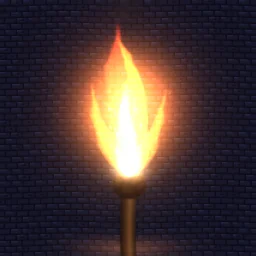
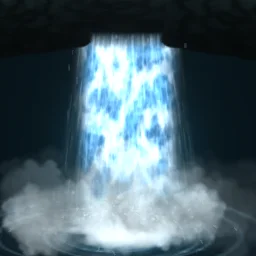
Open Dungeon Wall Torch: four painted flame tongues climb off a cloth head, each on its own Flow rhythm. Or describe yours: build "a painted waterfall that pours and loops" with the agent (uses 1 build; your first one needs no account).
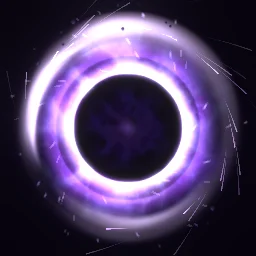
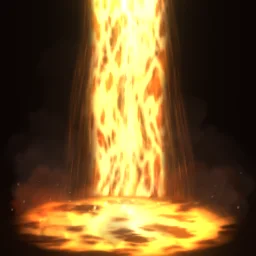
Learn it hands-on: the Flow lesson has you set a torch's still flame moving: add Flow, hold its base on the torch, make the licks longer and faster and add turbulence. Three small examples each show one field: a stream that wraps (Direction with Wrap on repeating water tiles), a whirlpool swirl (Swirl, the dark eye held still) and churning lava (the Noise field).
Animate an image step by step
- In the studio, press + in the Layers panel and choose Object from image to upload a PNG, or add an Object and pick a picture under Image. Flow moves detail, so choose an image with plenty of it: streaks, veins, noise and highlights. A flat shape only smears.
- Under Sprite effects, press Add sprite effect and choose Flow (under Distortion). It starts flowing upward: Field Direction at Direction -90, Strength 24 px, Cycle 1 s.
- Pick the Field. Direction sends everything one way (-90 up for fire and smoke, 90 down for water, 0 right), measured in the image itself, so it turns and flips with the sprite. Outward and Inward run from or into the centre, Swirl turns round it (Spin sets clockwise or anticlockwise) and Noise churns on curl noise with no direction at all.
- Set the speed. Strength is how far the pixels travel in one cycle and Cycle how long that slide lasts before the cross-fade takes over, so the speed is Strength divided by Cycle. More strength reads faster but smears detail; a shorter cycle keeps it crisp. In a perfect loop the cycle snaps so whole cycles fit the loop.
- Add Turbulence (0.3 to 0.6) to mix curl noise into the field, so fire flickers and water curls instead of sliding like a belt. Noise size sets the size of the swirls in px; Seed picks another pattern.
- Keep part of it still with Hold still: Bottom for a flame on its torch, Top for a waterfall hanging from its lip, Centre for a portal's core, Edges for a pool's rim. Hold reach is the share of the sprite over which the flow builds up from still.
- For a square texture such as a water, lava or smoke plate, raise Edge fade so its frame edges fade out. For an image that tiles seamlessly, turn on Wrap: it is read as a repeating tile, so it flows in from the opposite edge instead of leaving a gap.
- Stack it. The library effects use two to four flowing layers at different sizes, speeds and seeds, a glow behind, and particles that ride the same motion: embers on the heat, spray off the water, sparks pulled into the portal. Then press Export.
Every Flow setting
| Setting | What it does | Start at |
|---|---|---|
| Field | Direction, Outward, Inward, Swirl or Noise. | Direction for fire and water, Swirl for portals, Noise for lava and clouds |
| Direction | The way a Direction field flows, in the image's own frame: -90 up, 90 down, 0 right. | -90 for fire, 90 for water |
| Spin | Clockwise or anticlockwise, for Swirl. | Clockwise |
| Turbulence | Curl noise mixed into the field (Noise is all noise already). | 0.3 to 0.6 |
| Noise size | Size of the noise swirls, in px. | 30 to 60 px |
| Strength | How far pixels travel in one cycle, in px. 0 turns Flow off. | 40 to 90 px for flames, 150 to 280 px for fast water |
| Cycle | Length of one slide before the cross-fade, in seconds. Snapped to the loop. | 0.3 to 0.6 s; 1.5 s for slow lava |
| Seed | Another noise pattern. | A different seed per layer |
| Hold still and Hold reach | Keep the bottom, top, centre or edges still, and how far in the flow builds up. | Bottom with a reach of 0.3 for a flame |
| Edge fade | Fades the image toward its frame edges, in px. | 10 to 45 px on square textures |
| Wrap | Reads the image as a repeating tile. | On for seamless textures only |
| Effect | Field | Hold still | Strength and cycle | Also |
|---|---|---|---|---|
| Dungeon Wall Torch | Direction -90 | Bottom, reach 0.3 | 84 px in 0.4 s (the flame body) | Turbulence 0.55, Noise size 42 px |
| Looping Waterfall | Direction 90 | Top, reach 0.06 | 280 px in 0.5 s (the sheet) | Edge fade 44 px, five streak layers at 330 to 400 px |
| Summoning Portal | Swirl | Centre, reach 0.35 | 150 px in 0.6 s | Turbulence 0.3; the layer also spins |
| Lava Fall | Noise (the pool) | None | 46 px in 1.5 s | Noise size 56 px |
Save the flow map for your engine
To animate the image in your game instead of baking frames, open the Flow card's menu (the three dots) and choose Save flow map. It downloads <layer name>-flow-map.png at the size of the layer's image frame (its long side at most 2048 px), with the field laid over the sprite as it is drawn, so Noise size and Hold reach land where they do in the studio. Red is the rightward part of each direction and green the upward part, 128 is still and blue is 0. Directions are at most unit length and fade to 128 where Hold still keeps the image still. Strength and Cycle are not in the file: your shader sets them.
// The two-copy flow the studio draws, in GLSL; any shader language works the same way.
// uv: the sprite's own UV. strength: Flow's Strength divided by the sprite's size in px.
vec2 flow = texture(flowMap, uv).rg * 2.0 - 1.0; // red right, green up
float phase = fract(time / cycle);
vec2 uvA = uv - flow * strength * (phase - 0.5);
vec2 uvB = uv - flow * strength * (fract(phase + 0.5) - 0.5);
float wB = abs(2.0 * phase - 1.0);
vec4 color = mix(texture(sprite, uvA), texture(sprite, uvB), wB);
Green points up, which matches Unity, where UV v runs up. Godot and Unreal run v down, so flip it there (flow.y = -flow.y). Read the map as data, not colour: turn sRGB off on its import in Unity and Unreal, and in Godot use a plain sampler2D uniform with no colour hint, so 128 stays still. If you would rather not write a shader, export the flowing effect as a spritesheet or GIF like any other effect.
Tips
- The first frame is the painting. At the loop start the copy on show is at rest, so frame 0 shows the image exactly as it is: the library posters are taken there.
- Smear means too much strength. If the detail turns to mush, lower Strength or shorten Cycle. If the image seems to pulse, it lacks the fine detail the cross-fade hides in.
- Several speeds look natural. Layer copies at different sizes, strengths, cycles and seeds, as the torch does with its back, body, heart and core tongues.
- It follows the sprite. The field lives in the image's frame, so rotating or flipping the object takes the flow with it. The looping guide covers the rest of a seamless loop.
Set your own painting moving
Open a Flow effect and swap in your own image, or start from the small examples and change one setting at a time.
Questions
What is a flow map?
A texture that stores a direction for every pixel of an image, usually red for left to right and green for down to up. A shader slides the image along those directions in two copies that cross-fade, so water, lava and fire move without drawn frames.
Does a Flow animation loop without a jump?
Yes. Each copy is hidden at the moment it jumps back, and in a perfect loop the Cycle snaps so whole cycles fit the loop, so the last frame runs into the first.
How do I use the flow map in Unity, Godot or Unreal?
Choose Save flow map in the Flow card's menu, import the PNG as data with sRGB off, decode it as rg times 2 minus 1, and slide two samples of your sprite along it half a cycle apart, cross-fading between them. Flip green in Godot and Unreal, whose UV v runs down.
Which images work best with Flow?
Images with fine detail along the flow: streaky water, veined lava, wispy flame tongues, noisy clouds. Flat colour shows no movement, and very strong flow smears any detail.