Gradient map VFX: one effect, many colourways
Build an effect once in greys and recolour it with a gradient map: fire, ice, poison and holy colourways from one ramp each, cel bands for a toon look, and a grey sheet plus ramp PNG your game recolours at runtime.
Effects artists often build an effect in greys and colour it last with a gradient map: every pixel's brightness picks a colour on a ramp, dark tones from the left end, bright ones from the right. One grey flame then becomes fire, ice, poison or holy light, each a designed colourway rather than a tint. The Gradient map post filter in ParticleFX Studio does this on the whole effect with a ramp of 2 to 5 colours, keeps transparency, never recolours the canvas background, and can export the grey sheet plus its ramp so your game recolours one sheet at runtime.
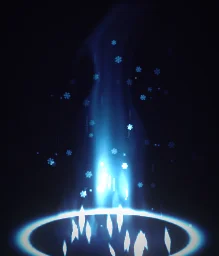
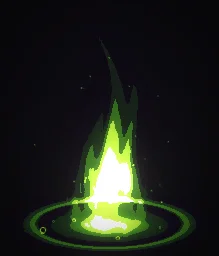
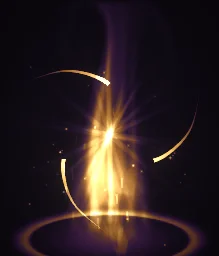
The quick way: start from the library
Open Fire to Ice Flame: one blaze built in greys burns as fire, freezes to ice and thaws back, two gradient maps switched with their Mix. Or describe yours: build "a grey magic flame in three colourways" with the agent (uses 1 build; your first one needs no account).
Learn it hands-on: the Gradient map lesson has you turn a grey flame into fire, step it into cel bands, recolour the ramp to an ice flame and export the grey sheet with its ramp. Two small examples each show one idea: three colourways (one grey orb through fire, ice and toxic, with keyed Mix) and cel bands (a looping orb stepped into four hard bands, all visible on every frame).
Recolour an effect step by step
- Build the effect in whites and greys: set Colour A and Colour B from white to mid grey, and give Colour over Life greys that fade with alpha. With Blend on Add, overlaps get brighter, and the map reads brighter as hotter, so the core takes the bright end of the ramp and the fringes the dark end. Keep the greys in range: if the whole core turns to the last colour with only a thin coloured rim, the overlaps have saturated to white, so lower the particle Opacity to about 0.3 to 0.5 or darken the greys; if everything takes the dark end, raise them.
- Select Effect settings at the top of the Layers panel. Under Post filters, press Add filter and choose Gradient map. Its default ramp runs plum, red, gold and warm white: fire. Filters run top to bottom, and the library effects put the map before Bloom (drag its card up) so the glow takes the ramp colours.
- Edit the Ramp. Click the bar to add a stop (up to 5), drag stops along it, select one to set its colour and opacity, and drag a stop off the bar or press Delete to remove it. Darkest tones sit on the left, brightest on the right; a stop below full opacity fades those tones out.
- Set Bands: 0 keeps the ramp smooth, 3 to 6 snaps it into hard steps for a toon or cel-shaded look.
- Set Brightness from. Light reads brightness as seen over black, so faint glow edges take the dark end: right for fire, magic and energy. Colour reads the colour alone, ignoring transparency, for solid sprites and smoke that should keep one tone to its edge.
- For a second colourway in the same effect, add another Gradient map and keyframe the Mix of both: one fades from 1 to 0 while the other fades from 0 to 1, best with an ease in-out over 0.3 to 0.4 s.
Every Gradient map setting
| Setting | What it does | Start at |
|---|---|---|
| Ramp | 2 to 5 colours from dark to bright, each with its own opacity. | 4 or 5 stops: a contrasting dark, the hue, a lighter hue, a near white |
| Bands | 0 is smooth; 2 or more snaps the brightness to that many hard steps. | 0 for realistic fire, 4 or 5 for toon |
| Mix | Blends with the original colours. Keyframe it to crossfade colourways. | 1 |
| Brightness from | Light (as seen over black) or Colour (the colour alone). | Light for glowing effects |
| Colourway | Effect | Stops |
|---|---|---|
| Fire | Fire to Ice Flame | #16040e #8e1408 #ff5a14 #ffc43c #fffbe8 |
| Ice | Fire to Ice Flame | #0a0626 #1e3cae #2ab8ff #bafbff #ffffff |
| Toxic | Toxic Fire | #1a0630 #2a6a24 #5ad41e #d2ff3a #fbffdc |
| Holy | Holy Fire | #140a2c #6a2a80 #e0802a #ffcc6a #fff0c4 |
Toxic Fire runs five stops from a violet shadow through acid green to a lime white core with Bands 5, so the flames read as hard toon steps with a purple rim. Holy Fire stays smooth from indigo through violet and amber to gold, and stops short of pure white so the core keeps its structure. The colour theory guide covers why a ramp needs a contrasting dark end.
For your engine: the grey sheet and its ramp
To recolour one sheet in your game instead of exporting every colourway, press Export, choose Spritesheet and turn on Gradient map for engines (it shows when the effect has a gradient map). The sheet is written in greys, the brightness the first enabled gradient map reads, at full mix (any later gradient maps are left out), and name_ramp.png goes beside it in the ZIP: the ramp as a 256 x 1 strip with its opacity. In your shader, look the ramp up at the sheet's red channel and keep the sheet's alpha. With Bands on, the sheet already holds the stepped greys, so the lookup lands on the same steps.
shader_type canvas_item;
// Godot 4: on the Sprite2D or AnimatedSprite2D that plays the grey sheet.
uniform sampler2D ramp : filter_linear, repeat_disable;

void fragment() {
  vec4 grey = texture(TEXTURE, UV);
  vec4 tint = texture(ramp, vec2(grey.r, 0.5));
  COLOR = vec4(tint.rgb, grey.a * tint.a);
}
In Unity Shader Graph, sample the sheet, feed its R into the U of a second Sample Texture 2D that reads the ramp (V 0.5), take the colour from the ramp and multiply the two alphas. In an Unreal material, do the same with a MakeFloat2 of the sheet's R and 0.5 as the ramp's UVs. Import the grey sheet with sRGB off, so its red channel is read as stored, and set the ramp to clamp rather than repeat, so its two ends never blend. Swap the ramp texture for each colourway.
Give one effect every colourway
Open a gradient map effect and drag its ramp stops, or build a new effect in greys and add the filter last.
Questions
What is a gradient map in VFX?
A recolour by brightness: every pixel's brightness is looked up on a colour ramp, so dark tones take the colour at the left end and bright tones the colour at the right. An effect built in greys can then take any colourway.
Why does the background not change colour?
The Gradient map never recolours the canvas background, only the effect drawn over it. Exported with a transparent background, the effect carries its colours alone.
How do I recolour an effect at runtime in my game?
Export a spritesheet with Gradient map for engines on. You get the sheet in greys and name_ramp.png, a 256 x 1 strip of the ramp. A shader that samples the ramp at the sheet's red channel and keeps its alpha recolours it, and a different ramp gives a different colourway.
Should the ramp be smooth or banded?
Smooth (Bands 0) for fire, magic and light that should glow softly. Four to six bands for a toon or cel-shaded look, as in Toxic Fire.