Boids flocking particles: swarms of birds, bats and fish
Make particles flock like birds, bats, fish and bees with boids: separation, alignment and cohesion, a target to circle or chase, wing beats and sprites that face their flight, looping seamlessly for 2D games.
Real flocks have no leader. Craig Reynolds' boids showed that three rules about the nearest neighbours are enough: keep your distance (separation), fly the way they fly (alignment) and stay with the group (cohesion). Birds wheel, fish school and bees swarm from those rules alone. The Flock module in ParticleFX Studio runs them on any emitter, with a minimum and maximum speed and an optional target to circle or chase. Its neighbour sums are exact, so a flock replays the same in the studio, in every export and in a perfect loop.
The quick way: start from the library
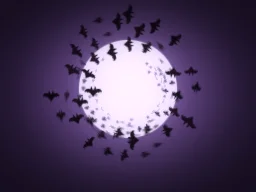
Open Vampire Bat Swarm: a hundred bats burst out of a blood moon, wheel round it and break away past the camera. Or describe yours: build "crows circling overhead at dusk" with the agent (uses 1 build; your first one needs no account).
Learn it hands-on: the Flock lesson has you turn a burst of bats into a flock that chases its emitter round the moon, turns as one and keeps its wing room. Two small examples each show one target: a school that follows (koi chase their emitter as it rides an orbit) and a swarm that gathers (fireflies gather round a lantern point).
Build a flock step by step
- In the studio, add an emitter (A on the stage) and switch the Inspector to All settings. Set Rate to 0 and add one burst of 30 to 60 under Bursts at 0 s, with a Lifetime just under the loop length, so each loop's flock lives one loop.
- Give it a creature. Pick a Sprite such as Bat, Butterfly or Feather, or your own image under Custom image, and set Blend to Normal for dark silhouettes. Turn on Align to velocity so each one faces where it flies, with Align offset 90 for sprites drawn nose up.
- Under Behaviour, press Add module and choose Flock (under Forces). The particles start to bunch, turn together and keep apart.
- Set how far each one sees: Neighbour radius 40 to 90 px. Set Personal space near the sprite's size and Separation at 3 to 8, so they never overlap.
- Choose the kind of group. Alignment near 0 makes a swarm (bees, fireflies, gnats), 1 to 2 a flock (birds, bats), 3 to 6 a school of fish that turns as one. Cohesion 0.5 to 2 pulls them into a ball; 0 leaves loose streams.
- Set Min speed and Max speed. Birds and bats never hover, so a minimum of half the maximum keeps them banking instead of braking; 0 lets them stop.
- Give them somewhere to go with Target. Point steers them to an X and Y: a swarm loops round it. Emitter makes them chase the emitter, so give the emitter a Ride path (a circle or a drawn path) and the flock circles or sweeps after it. Target pull sets how hard they turn.
- Add life: a Stretch over Life curve that dips and rises a few dozen times beats the wings, Wiggle adds jitter and Opacity over Life fades them in and out at the loop ends.
Every Flock setting
| Setting | What it does | Start at |
|---|---|---|
| Neighbour radius | How far each particle sees its flockmates. Larger gives bigger, calmer flocks. | 40 to 90 px |
| Personal space | Separation pushes apart only closer than this. | About the sprite's size |
| Separation | How hard they keep their personal space. | 3 to 8 |
| Alignment | How quickly they turn to their neighbours' heading, per second. | 0.2 swarm, 1.5 flock, 3 to 6 school |
| Cohesion | How hard they steer to the middle of their neighbours. | 0.3 to 1; 0 for streams |
| Min speed and Max speed | Slower ones speed up; the maximum is the cruise speed and cap, and every steer is scaled by it. | For bats, about 120 and 220 px/s |
| Target | None, Point (an X and Y) or Emitter (follow the emitter, for example along its Ride path). | Point for swarms, Emitter for chases |
| Target pull | How quickly they turn toward the target, per second. Keyframe it to 0 to let the flock break away. | 1.5 to 3 |
| Effect | Alignment | Cohesion | Target | Also |
|---|---|---|---|---|
| Vampire Bat Swarm | 1.6 | 0.5 | Point on the moon, Target pull 1.8 keyed to 0 for the break | A Vortex turns the ring; three depths of bats |
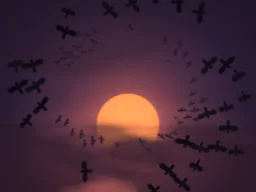
| Crow Flock | 1.2 | 0 | None | A Vortex and a pushing Magnet hold the ring overhead |
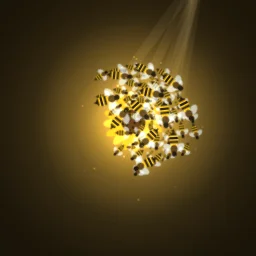
| Bee Swarm | 0.2 | 0.3 | Point on the sunflower, Target pull 2.8 | Separation 6, Min speed 100, Max speed 220 px/s |
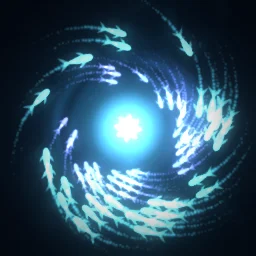
| Spirit Fish Spiral | 2 | 0.4 | None | A Vortex pulls the school into spiral arms |
Flocks in a perfect loop
A flock depends on everyone in it, so a loop could never close if this loop's birds steered by last loop's. In a perfect loop each particle flocks only with those born in the same loop cycle, so every cycle's flock repeats the one before bit for bit. The simplest flock is one burst a loop with a lifetime just under the loop, fading in and out. For a flock that is always on screen, start a second burst half a loop later: it flies with the first, toward the same target, and is still there when the next loop's burst appears. Each layer also flocks on its own, so a far and a near layer of bats move as two flocks; give them different sizes and speeds for depth.
In your engine
The flocking is simulated in the studio and drawn into the frames you export, so a spritesheet or GIF of a flock plays anywhere with no code. Export it with a transparent background and play it over your scene, or use the live web runtime, which runs the same simulation in the browser. The timing guide helps place the break or the swoop on the beat.
Start a flock of your own
Open a flocking effect and swap the sprite, or start from the small examples and change one setting at a time.
Questions
What are boids?
An algorithm by Craig Reynolds for flocking: every member steers by three rules about its nearest neighbours, separation, alignment and cohesion. Birds, fish and insects in games and films are often animated this way.
How do I make a flock follow a path?
Set the Flock module's Target to Emitter and give the emitter a Ride path. The emitter travels along the path and the flock chases it, cutting corners like real birds. Target pull sets how tightly they follow.
Why does my flock fly off the screen?
With no target nothing brings it back. Set Target to Point in the middle of the frame, or to Emitter with the emitter riding a path, and raise Target pull. Lowering Max speed also keeps the loops smaller.
Does a flocking effect loop seamlessly?
Yes, with Perfect loop on. Particles flock only with those born in the same loop cycle, so each cycle repeats the last exactly; spawn the flock in a burst each loop and fade it in and out.