How to make cartoon smoke and toon VFX for games
Make cartoon smoke, toon fire, water splashes and dust clouds for 2D games: particles that merge into solid cel-shaded shapes with hard colour bands, an ink outline and a rim light, exported as a spritesheet or GIF.
Hand-drawn 2D effects (anime smoke, cartoon fire, toon water) are painted as flat shapes: a solid silhouette, two or three hard bands of shading and an ink line round the outside. Soft particle sprites never look like that, because every particle stays its own glowing disc. The Toon render mode in ParticleFX Studio draws a layer the painted way: its particles merge into one solid shape with crisp edges, hard colour bands that put a shadow on the far side of every bump, an ink outline and an optional rim light. The particles still move like particles, so drag, gravity and the over-life curves shape the cloud while it keeps the hand-drawn look.
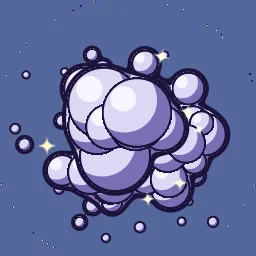
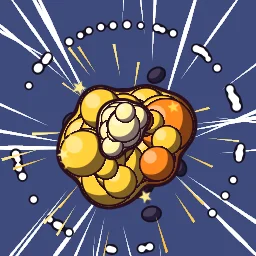
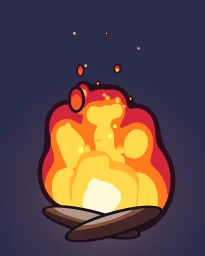
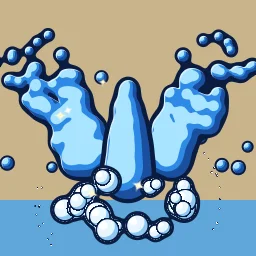
The quick way: start from the library
Open Cartoon Smoke Puff in the studio and change its colours, or describe yours: build "a cartoon smoke puff for a vanishing ninja" with the agent (uses 1 build; your first one needs no account).
Learn it hands-on: the Toon shapes lesson has you switch plain round sprites to Toon, then set how readily they merge, where the light comes from and how bold the ink is. Two small examples each show one idea: Toon: bands, light and ink keys the light angle so you can watch the shadow bands swing round a cloud, and Toon: merged or puffs plays the same poof with both kinds of shading side by side.
Build a cartoon smoke puff step by step
- In the studio, press A on the stage, or + in the Layers panel and Emitter, to add an emitter. Switch the Inspector to All settings.
- Under Render, set Draw as to Toon, and under Layer set Blend to Normal: a toon shape is matter, not light. The particles fuse into one solid shape with an ink line round it.
- Make a poof instead of a stream. Set Rate to 0 and add one burst of 25 to 30 particles under Bursts. Set the emitter Shape to Circle with a Radius of about 20, Direction to Outward, a wide Speed range (about 250 to 650 px/s) and a Size of 30 to 65 px. Add Drag at 5 to 7, so the fast puffs stop at the edge of the cloud and the slow ones fill its middle.
- Hold the opacity and animate the size. In Toon mode opacity shrinks a particle instead of fading it, and without an Opacity over Life module every particle fades, and so shrinks, over its whole life. Add Opacity over Life held at 1, and a Size over Life that pops past full size (about 1.15 at a tenth of the life), settles, holds and falls to 0. A Lifetime range of about 0.5 to 1 s makes the puffs leave one by one.
- Set Shading to Puffs and Merge to about 0.08: every puff keeps its own round shading and a thin ink line where it overlaps the one behind, the cauliflower look. Set Colours to Ramp and pick Shadow, Base and Highlight, such as a violet grey, a pale lilac and near white.
- Light it and ink it. Light angle -135 lights it from the top left; Shadow size 0.5 gives crescents that read at a glance. Set Outline to 4 to 4.5 px in a dark tint of the subject (Outline colour), not pure black.
- Add the small parts on their own layers: a one-frame flash, a ring of beads, a few Speed lines and twinkles. Then press Export for a spritesheet, GIF or PNG frames.
Every toon setting
| Setting | What it does | Start at |
|---|---|---|
| Merge | How readily nearby particles fuse into one shape. At 0 they stay separate round shapes; at 1 they melt together from far apart. A lone particle always shows its own size. | 0.4 to 0.65 for liquids, flames and goo; 0.05 to 0.15 with Puffs shading |
| Edge softness | Softens the edge and the band steps. | 0, crisp |
| Bands | Hard shading steps: 1 flat, 2 shadow and base, 3 adds a highlight, 4 adds a step between shadow and base. | 2 or 3 |
| Shading | Merged shades the whole shape as one. Puffs gives every particle its own shadow crescent, highlight and an ink crease where it overlaps the puff behind. | Puffs for smoke, explosions and dust; Merged for water, fire and ink |
| Colours | Particle bands each particle's own colour (Colour over Life still applies; the shadow is darker and cooler, the highlight paler). Ramp uses the Shadow, Base and Highlight colours. | Ramp for a designed palette |
| Light angle | Where the light comes from: -90 above, -135 the top left, 90 below. Shadows sit on the far side of every bump. | -135; 90 for flames lit from their base |
| Shadow size | How far the shadow bands reach into each shape, as a share of its radius. At 0 the bands are rings round a bright core. | 0.4 to 0.6 |
| Outline and Outline colour | The ink line round the merged shape, in px. 0 is none. | 2.5 to 4.5 px in a dark tint of the subject |
| Rim light | A bright line just inside the lit edge, the wet, glossy look. | 1.5 to 2.5 px for water, slime and magic; 0 for smoke |
| Draw order | Which puffs are in front with Puffs shading: Newest on top or Oldest on top. | Newest on top |
Merged or puffs
Merged treats the layer as one surface: the shape is lit as a whole, so each bump of the outline carries its own crescent of shadow but the inside reads as one smooth mass. That suits liquids, flames, slime and ink, with Merge around 0.4 to 0.65. Puffs keeps the silhouette and the outer ink line, but inside it every pixel belongs to the front-most puff that covers it, so each puff keeps its own colour, crescent and highlight, and a thin ink line runs where it overlaps the one behind. With a low Merge (0.05 to 0.15) the outline dips between the puffs, which is the anime smoke and explosion look.
| Effect | Shading | Merge | Other settings |
|---|---|---|---|
| Cartoon Smoke Puff | Puffs | 0.08 | Shadow size 0.5, Outline 4.5 px, 26 puffs at 30 to 62 px with Drag 6.5 |
| Cartoon Fire Loop | Merged | 0.62 | Light angle 90 (lit from the base), Shadow size 0.75, a red, orange and yellow ramp |
| Toon Water Splash | Merged | 0.4 to 0.66 | Rim light 2 px, Outline 3.5 px, foam on a Puffs layer |
| Cartoon Dust Cloud | Puffs | 0.05 to 0.08 | Shadow size 0.55, Outline 4 px, a tan ramp with brown ink |
What makes toon FX read
- One mass per layer. Every toon layer is its own merged shape, so whatever should read as one cloud is one layer, and fire, smoke and sparks go on separate layers. For depth, put a darker back layer under a lighter front layer of fewer, smaller puffs: the front layer's ink draws the overlaps inside the mass.
- Pop, hold, shrink. Toon puffs do not fade. They pop past full size, hold, and shrink to nothing on Size over Life, and spread lives make them leave one at a time.
- Dense middle, lumpy edge. One burst with a wide speed range and strong drag (4 to 7) gives a packed middle and outer lobes at once.
- Step the colour for fireballs. With Colours on Particle, a stepped Colour over Life from white to yellow to orange to red cools each puff as it ages.
- Timing does half the work. An anticipation beat, a one to three frame flash, a fast burst, a hold and a staggered shrink: the timing guide covers each beat, and the impact frame guide the ink flash and speed lines that go with it.
In your engine
Toon shapes are drawn into the frames you export, so a spritesheet, GIF, PNG frames or video of a toon effect plays in any engine with no special shader: see the Unity and Godot pages for the import. In the live web runtime the toon layers are drawn every frame instead of baked.
Make your own cartoon smoke
Open a toon effect and change its ramp, light and ink, or describe one and the agent builds it on a live canvas. A free account gets 20 builds to start.
Questions
How do I make cartoon smoke for a 2D game?
Draw one burst of round particles with the Toon render mode and Puffs shading, a low Merge near 0.08, two or three bands from a ramp and an ink outline. Let the puffs pop in, hold and shrink out, then export the result as a spritesheet or GIF for your engine.
Why do my toon particles shrink instead of fading?
In Toon mode opacity scales a particle's radius instead of its transparency, so cel shapes stay solid. Hold Opacity over Life at 1 and use Size over Life to grow and shrink them. Without an Opacity over Life module the particles fade, and so shrink, over their whole life.
What is the difference between Merged and Puffs shading?
Merged shades the whole shape as one surface, right for water, fire and goo. Puffs keeps the merged outline but shades every particle on its own, with an ink crease where one overlaps another, which is the cauliflower look of anime smoke, explosions and dust.
Do I need a toon shader in my engine?
No. The toon look is baked into the exported frames, so a spritesheet or GIF plays as it is. Only the live web runtime draws toon layers each frame.