Wind VFX for Roblox
Free wind effects for Roblox: a tornado, gusts, a wind slash, updraft, leaf whirlwind, wind lines and a double jump air burst as flipbooks, with Luau that sends a tornado across the map.
Wind has no body of its own, so a game draws it by what it carries: streak lines, dust, leaves and rings of air. That makes it light to add and useful everywhere movement matters in Roblox. A dash, a double jump, a fan that lifts the player and a tornado that crosses the map all read better with air drawn around them.
Tornadoes, gusts and air bursts
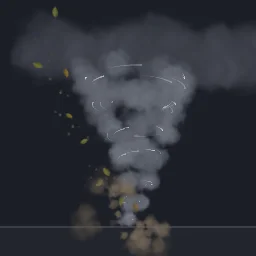 Tornado
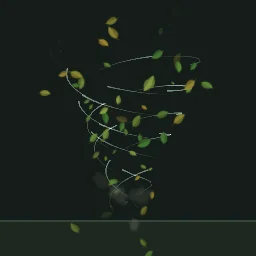 Leaf Whirlwind
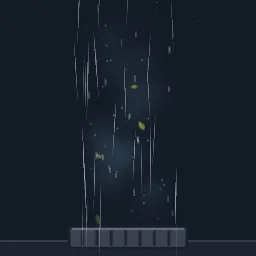 Updraft
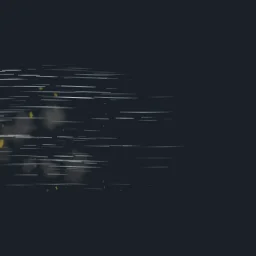 Wind Gust
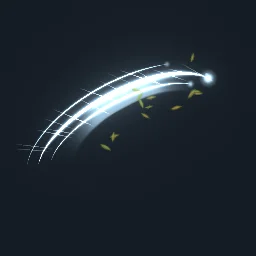 Wind Slash
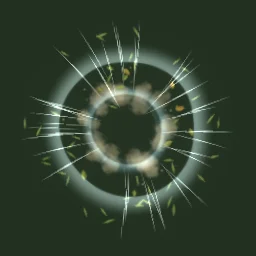 Wind Blast (Top-Down)
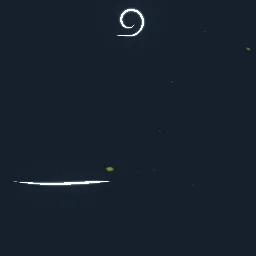 Swirling Wind Lines
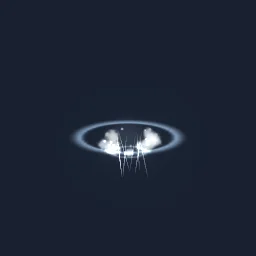 Double Jump Air Burst
- Funnels: Tornado is a grey storm funnel with debris, Leaf Whirlwind a lighter one for nature spells. Both loop.
- Lifts: Updraft is a column of rising streaks for fans, vents and jump pads.
- Attacks: Wind Gust sweeps a band of streaks across, Wind Slash is a cutting crescent, Wind Blast (Top-Down) bursts outward in a ring.
- Movement: Double Jump Air Burst goes under the feet on the second jump, and Swirling Wind Lines are cartoon curls for speed and weather.
A tornado that crosses the map
The emitter in the export has LockedToPart on, so the particle follows its part. Move the part and the tornado moves. This server function tweens a looping Tornado from one point to another and removes it at the end.
local TweenService = game:GetService("TweenService")
local template = game.ReplicatedStorage.Effects:WaitForChild("Tornado")

local function sendTornado(from: Vector3, to: Vector3, seconds: number)
	local size = template.Attachment.Flipbook.Size.Keypoints[1].Value
	local lift = Vector3.new(0, size / 2, 0) -- the foot of the funnel is at the bottom of the frame
	local fx = template:Clone()
	fx:PivotTo(CFrame.new(from + lift))
	fx.Parent = workspace

	local move = TweenService:Create(fx, TweenInfo.new(seconds, Enum.EasingStyle.Linear), { Position = to + lift })
	move.Completed:Once(function()
		fx:Destroy()
	end)
	move:Play()
end

sendTornado(Vector3.new(-60, 0, 0), Vector3.new(60, 0, 0), 10)
A tween on the server puts the tornado in the same place for everyone, which matters if it also does damage. To hurt players it passes, check the distance from each character to the part a few times a second, as the falloff loop on shockwave VFX does.
Settings for wind
- Glow off: wind is pale streaks and dust drawn with normal blending. Every effect on this page exports with Glow off, so it shows against a bright sky as well as a dark one.
- Size: 20 to 40 studs for a tornado hazard, the height of the lift for Updraft, 4 to 6 for Double Jump Air Burst.
- Upright: set Orientation to FacingCameraWorldUp for Tornado, Leaf Whirlwind and Updraft, so the funnel stays vertical when the camera tilts.
- From above: Wind Blast (Top-Down) is drawn from straight above. A ParticleEmitter faces the camera, so a picture drawn from straight above stands up like a sign. To lay one flat, play it on an ImageLabel in a SurfaceGui on the top face of a thin, invisible part, stepped with the script on UI effects.
- Direction: Wind Gust and Wind Slash sweep one way across their frame, and a particle that faces the camera cannot be aimed along a direction in the world. Use them where the camera angle is known, such as a side view or a cutscene, and the funnels and bursts everywhere else.
- Dust that matches the map: raise LightInfluence toward 1 so the dust in a tornado darkens with the scene at night.
The flipbook PNG is free: the ROBLOX button on every effect page needs no account, and a free account can also export it from the studio (3 effects a day) with the grid and texture size of your choice. The ready model, a .rbxmx with the emitter set up and a script that plays it, plus UIFlipbook.luau for UI, comes with any plan, from $7.99 a month.
Get it into your game
Every setting and both ways in, free PNG or ready model, are on the Roblox setup page. More picks by genre are on Free Roblox VFX, and any effect can be changed in the studio before you export it: recolour the dust to sand, snow or ash for your map.
Questions
How do I make a moving tornado in Roblox?
Play a looping tornado flipbook on a ParticleEmitter with LockedToPart on, then move its part with TweenService. The particle follows the part, so one tween carries the whole funnel across the map.
How do I add an effect to a double jump?
In the LocalScript that handles the second jump, clone an air burst at the character's feet when the jump fires and clean it up with Debris. To show it to other players, tell the server and have it fire a RemoteEvent to all clients.
Does the wind push players?
No. The flipbook is only the picture. For an updraft that lifts or a gust that pushes, apply your own force to characters inside the area in a script, and use the effect to show where that area is.
Can I use these effects in a game that earns Robux?
Yes. Exported effects, including ones started from the library, may be used in any project, commercial games included, with no credit required. Reselling the library itself as an effect pack is not allowed.